> For the complete documentation index, see [llms.txt](https://docs.aviator.co/llms.txt). Markdown versions of documentation pages are available by appending `.md` to page URLs; this page is available as [Markdown](https://docs.aviator.co/verify/setting-up-your-team.md).
# Setting up your team
Getting a team onto Verify has two halves. An admin turns on agent hooks for everyone working in a given repository. Then each engineer connects their GitHub account and sets up the CLI and the Aviator skill on their own machine, which is covered in [Setting up your machine](/verify/setting-up-your-machine.md).
This page is the admin half.
**Before you start:**
* The repository needs to be connected to Verify. See [Connect a repository](/verify/how-to-guides/connect-a-repository.md).
* Everyone who will use Verify needs an invite to your company's Aviator workspace.
## 1. Install the CLI
```bash
brew trust aviator-co/tap
brew install aviator-co/tap/aviator
```
`brew trust` is needed on Homebrew 6 and later, which only loads third-party taps you've trusted. On Linux, install the `.deb` or `.rpm` from the [releases page](https://github.com/aviator-co/aviator-cli/releases).
## 2. Run `aviator init`
`cd` to the repository you're setting up, then:
```bash
aviator init
```
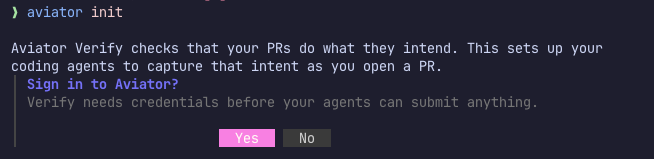
If you aren't signed in yet, it offers to sign you in first, which opens your browser and stores the session in your OS keychain.
init offers a sign-in when it can't find credentials
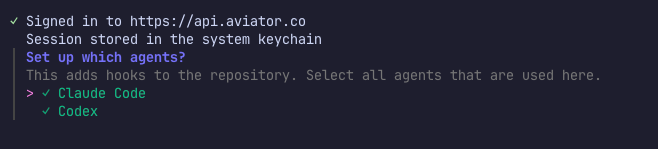
Then it asks which agents to set up. Select every agent used by your team in this repository, not just the one you use. The configuration is committed, so it covers your whole team.
Select every agent used in the repository
## 3. Commit the hooks
`init` writes `.claude/settings.json` for Claude Code and `.codex/hooks.json` for Codex, then prints the git commands to put them on a branch. Run those and open the PR. Merging it turns the hooks on for everyone.
Support for other agents is coming. If your team uses a different one, email and we'll send you the manual setup steps.
Every agent session in the repo then carries a standing instruction to capture intent and acceptance criteria before a PR, plus reminders at commit and PR time. None of it blocks. A teammate missing the CLI or a sign-in still commits and opens pull requests exactly as before, gets told what's missing at their next session start, and their changes simply don't reach Verify. See [Set up agent hooks](/verify/how-to-guides/set-up-agent-hooks.md) for the detail.
## 4. Send your team the setup steps
Everyone working in the repository sets up their own machine: [Setting up your machine](/verify/setting-up-your-machine.md).
## Add team guidance (optional)
To have agents follow your team's own instructions when they capture intent and acceptance criteria, commit them to `.aviator/verify/verify-submit-guidance.md`. The agent reads this file every time it runs `/verify-submit`. For example:
```markdown
- If the branch name has a Linear issue ID, read the issue and any Slack threads linked from it before writing the intent.
- Show the author where the change departs from the issue and ask whether each difference was intended, since plans often shift in discussion.
- Make sure the acceptance criteria cover every requirement from the issue that still applies.
- Describe user-facing behavior with the names from our product UI, not internal service names.
```
Guidance adds to `/verify-submit` rather than replacing any of it. Keep the file brief, since it's read on every submission.
## See also
* [Setting up your machine](/verify/setting-up-your-machine.md), the half your team does
* [Set up agent hooks](/verify/how-to-guides/set-up-agent-hooks.md), what each hook does and how to remove them
* [Connect a repository](/verify/how-to-guides/connect-a-repository.md)
* [Aviator CLI](/verify/reference/cli.md), the full command surface
* [Setting up org invariants](/verify/setting-up-org-invariants.md), the rules that apply to every change automatically
---
# Agent Instructions
This documentation is published with GitBook. GitBook is the documentation platform designed so that both humans and AI agents can read, navigate, and reason over technical content effectively. Learn more at gitbook.com.
## Querying This Documentation
If you need additional information that is not directly available in this page, you can query the documentation by asking a question.
Perform an HTTP GET request on the following URL with the `ask` and `goal` query parameters:
```
GET https://docs.aviator.co/verify/setting-up-your-team.md?ask=&goal=
```
`ask` is the immediate question: it should be specific, self-contained, and written in natural language.
`goal` is what the user is ultimately trying to achieve, the reason they need the answer. Sharing it helps GitBook give you a better, more relevant answer. A goal is most helpful when it describes the outcome the user wants rather than restating the question. For example, with `ask=how do I create an API token`, a goal like `automate deployments from our CI pipeline` lets GitBook tailor the answer to that use case.
The response will contain a direct answer to the question and relevant excerpts and sources from the documentation.
Use this mechanism when the answer is not explicitly present in the current page, you need clarification or additional context, or you want to retrieve related documentation sections.