> For the complete documentation index, see [llms.txt](https://docs.aviator.co/llms.txt). Markdown versions of documentation pages are available by appending `.md` to page URLs; this page is available as [Markdown](https://docs.aviator.co/verify/setting-up-your-machine.md).
# Setting up your machine
Your team uses Aviator Verify, which checks each pull request against the intent and acceptance criteria behind it. Your coding agent captures those as you work, once you've done the setup below.
## 1. Sign in to Aviator and connect your GitHub account
Sign in at [app.aviator.co](https://app.aviator.co). You need an invite to your company's workspace, so ask whoever set up Verify if you don't have one.
Then open [Settings → Personal → Integrations](https://app.aviator.co/settings/personal/integrations). The GitHub card should read **Connected**. If it reads **Not connected**, click **Connect with GitHub**. Without this, the pull requests you open never link back to Verify.
Click Connect with GitHub when the card reads Not connected
## 2. Install and set up the Aviator CLI
```bash
brew trust aviator-co/tap
brew install aviator-co/tap/aviator
aviator login
```
`brew trust` is needed on Homebrew 6 and later, and Linux users can grab the `.deb` or `.rpm` from the [releases page](https://github.com/aviator-co/aviator-cli/releases). `aviator login` opens your browser and stores the session in your OS keychain.
## 3. Install the Aviator skill
Your agent runs `/verify-submit` to capture the intent and criteria. It ships separately from the CLI, in the [Aviator agent plugins](https://github.com/aviator-co/agent-plugins).
In Claude Code:
```
/plugin marketplace add aviator-co/agent-plugins
/plugin install aviator@aviator-plugins
```
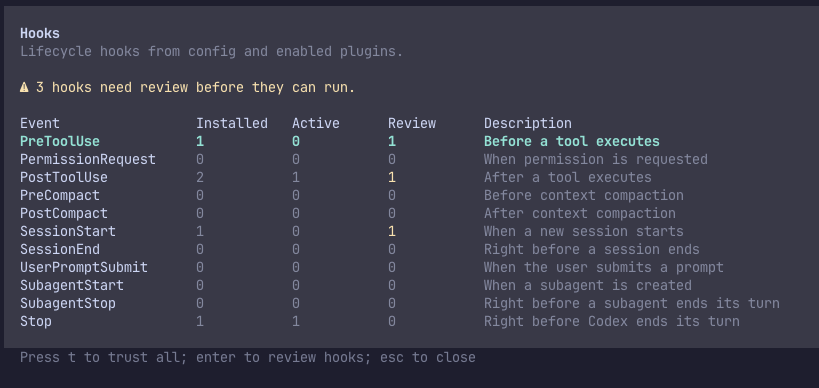
Codex users install the `verify-submit` skill from the same repository, then run `/hooks` and trust the Aviator hook. Nothing fires until you do.
Codex lists the three Aviator hooks as needing review until you trust them
If your team hasn't committed the hooks to the repo yet, set them up for yourself. `aviator init --scope local` covers just this repo and adds nothing you'd commit. `aviator init --scope self` covers every repo on this machine. See [Set up agent hooks](/verify/how-to-guides/set-up-agent-hooks.md#who-the-setup-covers).
## Check that it works
Start a **fresh** agent session in the repo, make a small change, and let it open a pull request. The agent should run `/verify-submit`, print a review URL, and put a link to the review at the top of the PR body. The Aviator Verify check then appears on the pull request.
The aviator/verify check on the pull request
## When something doesn't fire
| Symptom | Cause |
| -------------------------------------------------------- | --------------------------------------------------------------------------------------------------------------------------------------------------------------------- |
| The agent never mentions Verify | The session predates the hooks, so start a new one. Or the repo has no hooks yet, so set them up for yourself as above. |
| Nothing fires in Codex | The hook isn't trusted yet. Run `/hooks` in Codex. |
| `/verify-submit` isn't a command | The Aviator skill isn't installed on this machine. |
| The agent says the CLI isn't installed | It isn't on `PATH` here. Install it, step 2 above. |
| The agent says no credentials were found | Run `aviator login`. |
| Submitting fails with "Repository not found" | You're signed in to a personal account rather than your company's workspace. |
| The review exists but the pull request never links to it | Your GitHub account isn't connected. Check Settings → Personal → Integrations. |
| The pull request has no Verify check | The PR body has no link to the review, or the repo isn't connected. See [How a PR gets its review](/verify/reference/github-integration.md#how-a-pr-gets-its-review). |
## See also
* [Your first verification](/verify/your-first-spec.md), a hands-on run through the whole loop
* [Writing effective acceptance criteria](/verify/how-to-guides/writing-effective-acceptance-criteria.md)
* [Understanding verification results](/verify/how-to-guides/understanding-verification-results.md)
---
# Agent Instructions
This documentation is published with GitBook. GitBook is the documentation platform designed so that both humans and AI agents can read, navigate, and reason over technical content effectively. Learn more at gitbook.com.
## Querying This Documentation
If you need additional information that is not directly available in this page, you can query the documentation by asking a question.
Perform an HTTP GET request on the following URL with the `ask` and `goal` query parameters:
```
GET https://docs.aviator.co/verify/setting-up-your-machine.md?ask=&goal=
```
`ask` is the immediate question: it should be specific, self-contained, and written in natural language.
`goal` is what the user is ultimately trying to achieve, the reason they need the answer. Sharing it helps GitBook give you a better, more relevant answer. A goal is most helpful when it describes the outcome the user wants rather than restating the question. For example, with `ask=how do I create an API token`, a goal like `automate deployments from our CI pipeline` lets GitBook tailor the answer to that use case.
The response will contain a direct answer to the question and relevant excerpts and sources from the documentation.
Use this mechanism when the answer is not explicitly present in the current page, you need clarification or additional context, or you want to retrieve related documentation sections.