> For the complete documentation index, see [llms.txt](https://docs.aviator.co/llms.txt). Markdown versions of documentation pages are available by appending `.md` to page URLs; this page is available as [Markdown](https://docs.aviator.co/verify/how-to-guides/verify-on-github.md).
# Review verification on the pull request
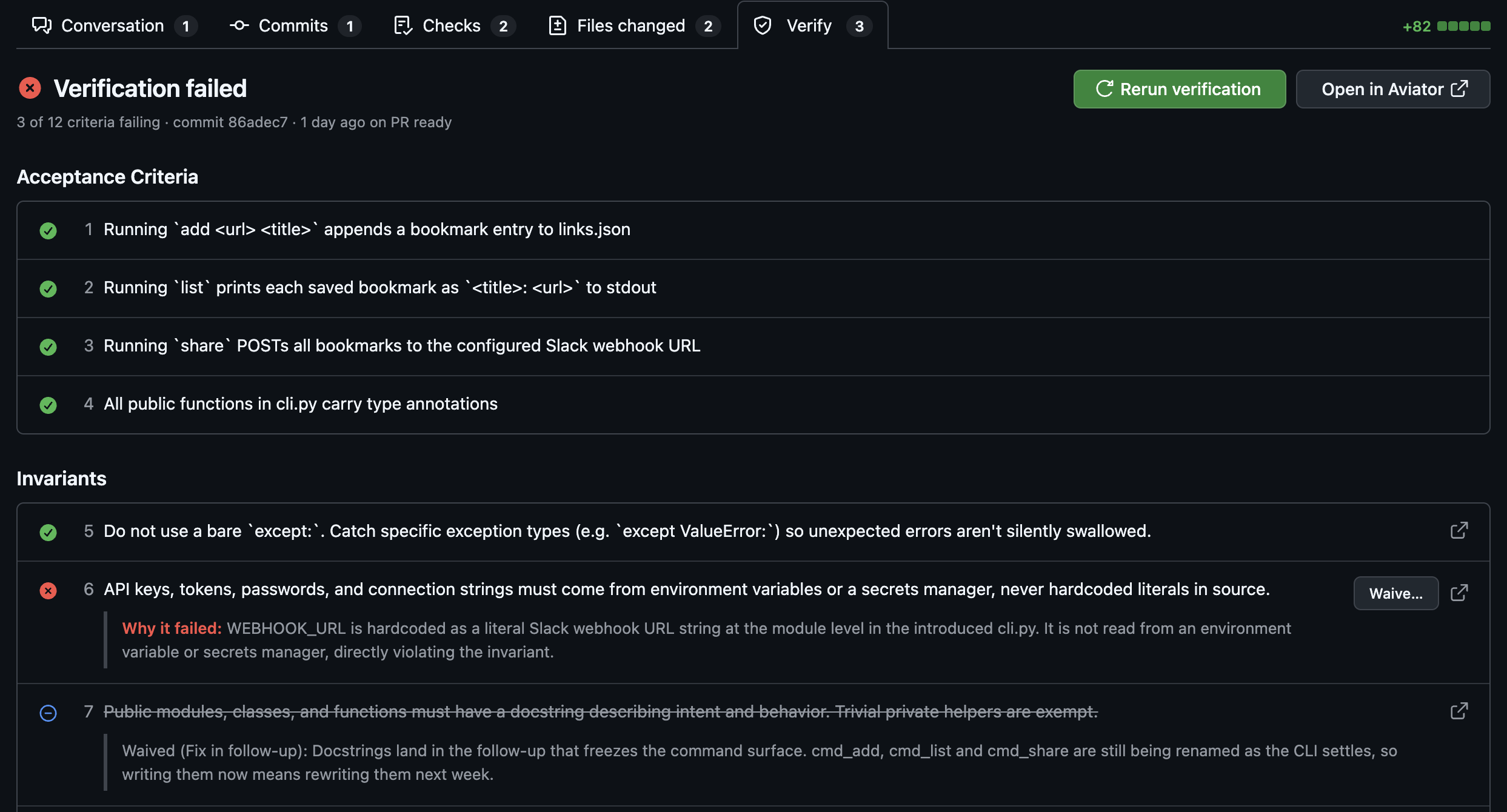
With the [Aviator Chrome extension](/aviator-chrome-extension.md), a **Verify** tab appears in the pull request's tab row, next to Files changed. It's a trimmed-down, live view of the review document, so you can see why verification failed and unblock the PR without leaving GitHub.
The Verify tab on a pull request with a failing run
### Prerequisites
* The [Aviator Chrome extension](/aviator-chrome-extension.md) installed and signed in to Aviator.
* The pull request has a verification run. The tab only appears once a run exists; PRs without one show nothing.
* An Aviator backend on version `2026.07.16-2` or newer. Aviator Cloud is always current. A self-hosted deployment older than that doesn't serve the data the tab reads, so the tab stays hidden.
### What it shows
The tab opens in place of GitHub's content and mirrors the review document:
* **The run outcome** — passed, passed with N accepted failures, failed, errored, in progress, or deferred (waiting on invariant selection).
* **The verified commit** and when and why the run happened (for example, "9 days ago on queue").
* **Every criterion and invariant** with its verdict icon and, for failing rows, the reason it failed. Invariants appear in their own section and link to their invariant page.
* **Waived rows** are struck through and show the waiver's category and reason.
The outcome tracks the `aviator/verify` check, so the tab never disagrees with it — a run that failed but has every failure waived reads as passed with accepted failures. Live updates arrive on their own; you don't need to refresh.
Use **Open in Aviator** for the full review document (evidence, scenarios, run history).
### Rerun verification
Select **Rerun verification** to start a new run against the PR's latest commit. It's unavailable while a run is in progress, and when the review has no open PR to verify against it explains why.
### Waive an invariant failure
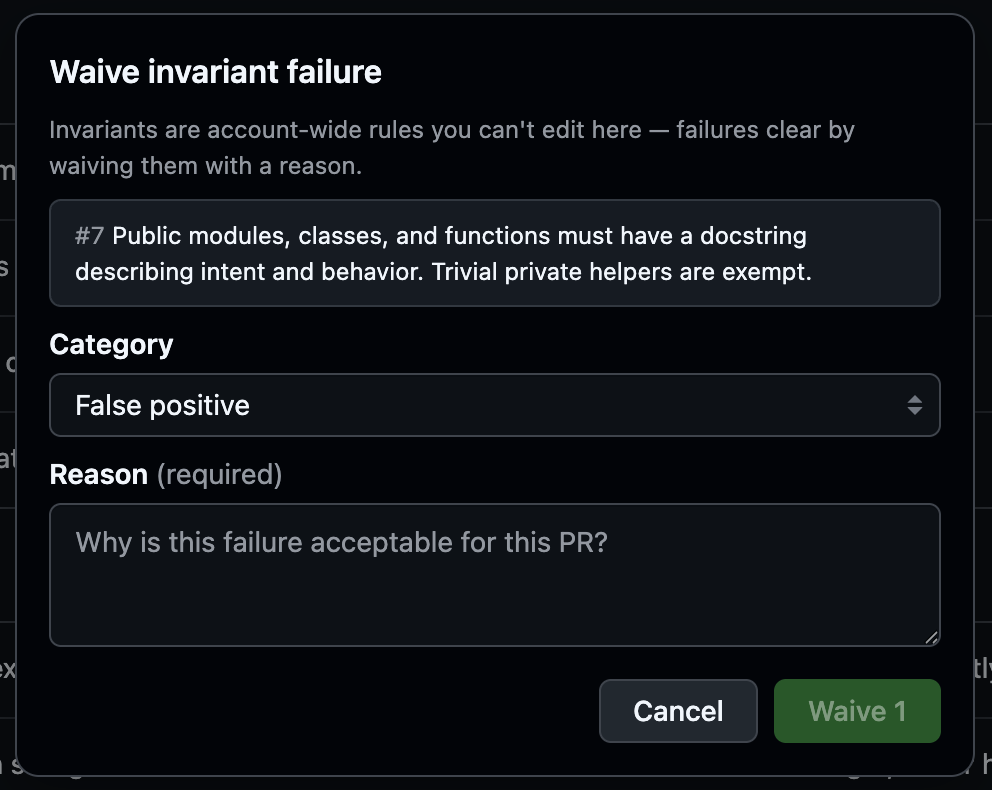
Failing invariant rows offer **Waive…**. Invariants are account-wide rules you can't edit here, so failures clear by waiving them:
1. Pick a category — **False positive**, **Doesn't apply**, **Accepted risk**, or **Fix in follow-up**.
2. Give a reason (required).
3. Confirm. The failure clears, the counter and header update, and the `aviator/verify` check is re-posted.
Waiving an invariant failure with a category and a reason
### Remove an acceptance criterion
Failing acceptance-criteria rows offer **Remove…**, which drops a criterion you don't want verified. The last remaining criterion and account invariants can't be removed; when the backend refuses, the tab tells you why.
### Related
* [Understanding verification results](/verify/how-to-guides/understanding-verification-results.md): reading results and fixing failures.
* [GitHub integration](/verify/reference/github-integration.md) — the `aviator/verify` check and its states.
---
# Agent Instructions
This documentation is published with GitBook. GitBook is the documentation platform designed so that both humans and AI agents can read, navigate, and reason over technical content effectively. Learn more at gitbook.com.
## Querying This Documentation
If you need additional information that is not directly available in this page, you can query the documentation by asking a question.
Perform an HTTP GET request on the following URL with the `ask` and `goal` query parameters:
```
GET https://docs.aviator.co/verify/how-to-guides/verify-on-github.md?ask=&goal=
```
`ask` is the immediate question: it should be specific, self-contained, and written in natural language.
`goal` is what the user is ultimately trying to achieve, the reason they need the answer. Sharing it helps GitBook give you a better, more relevant answer. A goal is most helpful when it describes the outcome the user wants rather than restating the question. For example, with `ask=how do I create an API token`, a goal like `automate deployments from our CI pipeline` lets GitBook tailor the answer to that use case.
The response will contain a direct answer to the question and relevant excerpts and sources from the documentation.
Use this mechanism when the answer is not explicitly present in the current page, you need clarification or additional context, or you want to retrieve related documentation sections.