> For the complete documentation index, see [llms.txt](https://docs.aviator.co/llms.txt). Markdown versions of documentation pages are available by appending `.md` to page URLs; this page is available as [Markdown](https://docs.aviator.co/verify/how-it-works.md).
# How it works
Verify replaces line-by-line code review with verification of *what the change is supposed to do*. You work with your agent locally. Aviator captures your intent through a CLI call, runs every acceptance criterion against the running code, and produces a review document with verdicts and evidence.
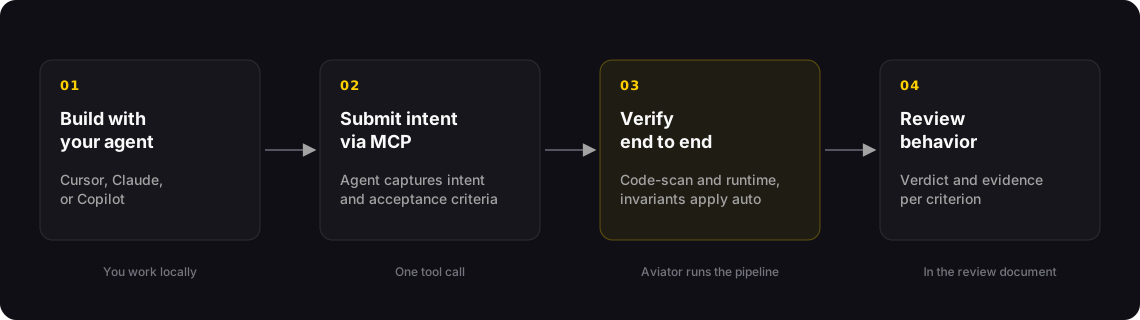
The end-to-end Verify loop
The full loop:
1. **Build with your agent.** Implement the task with Cursor, Claude, Copilot, or anything else you use today. No new tooling, no behavior change.
2. **Submit intent with the Aviator CLI.** When you're done, the agent runs `/verify-submit`, which reads the change and submits it through the [Aviator CLI](/verify/reference/cli.md). It captures the intent you and the agent agreed on and the acceptance criteria from what was built.
3. **Aviator verifies end to end.** Every criterion runs through the verification pipeline. Code-scan handles structural checks against the diff — this works out of the box. Runtime checks run against a preview environment if you've configured one (optional; see [Concepts: Previews](/verify/concepts/previews.md)). Matching invariants apply automatically.
4. **Review the behavior.** The reviewer sees the intent, the verdict per criterion, and the evidence behind each verdict. They can approve, waive with reason, or ask for another scenario on the spot.
### What gets submitted
The submission carries two things:
* **Intent** — a short statement of *what* this change is for. It carries the constraints that aren't visible from the diff alone.
* **Acceptance criteria** — verifiable assertions the change must satisfy. Each criterion is independent and has a clear pass/fail shape.
The agent generates both from what was actually built. You submit *after* implementing, not before — there is no separate "approve the spec first" step.
### The verification pipeline
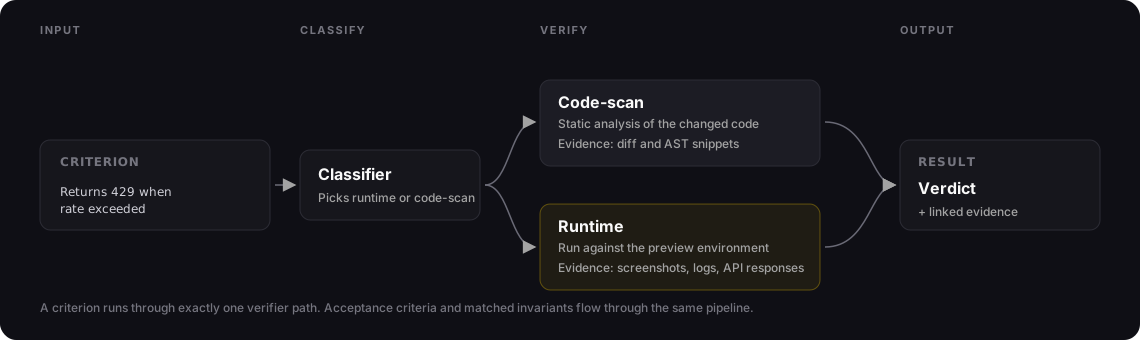
Every criterion runs through exactly one verifier. A classifier picks the verifier based on the criterion text and the files the change touched.
Each criterion is classified and routed to a single verifier path
| Verifier | Used for | Evidence captured |
| ------------- | ----------------------------------------------------------------------------------- | -------------------------------------------------------------------- |
| **Code-scan** | Structural assertions — file scope, dependency surface, function signatures | Diff or AST snippets that demonstrate the assertion |
| **Runtime** | Behavioral assertions — endpoint contracts, error shapes, side effects, UI behavior | Screenshots, console logs, DOM snapshots, API responses, full traces |
### Invariants in the loop
Acceptance criteria are what *this* change should do. **Invariants** are what *every* change should respect — your team's standing rules. They're a major part of the flow once you start using Verify seriously.
Four phases:
1. **Catalog.** Invariants live in an account-level catalog. Anyone can author them manually. Three of the AI sources worth knowing about:
* **PR-comment mining.** AI reads your team's actual PR review comments and proposes invariants from the patterns. The highest-leverage source — you're already enforcing these in review, this just encodes them.
* **Docs extraction.** Your `CONTRIBUTING.md`, `LLM.md`, or similar guidance files are read and proposed as invariants.
* **Repo-signal synthesis.** AI looks at the shape of the codebase and proposes rules that fit.
All AI drafts wait in pending status and need [approval](/verify/concepts/invariants.md#owner-teams) before they start producing verdicts.
2. **Selection.** When a review is submitted, an LLM **selector** reads the intent, the acceptance criteria, and the change set, and picks which eligible invariants legitimately apply to this change. Eligibility is gated by optional conditions on the invariant (e.g. `file_path_glob: src/**/*.py`); among the eligible, the selector decides what actually fits.
3. **Materialization.** Selected invariants are materialized as acceptance criteria on the review, tagged with `source: baseline_invariant`. From here they flow through the same verifier pipeline as user criteria — code-scan or runtime — and produce verdicts on the same review surface.
4. **Review and waivers.** Reviewers see invariant verdicts alongside user criteria. Invariant-sourced criteria can't be edited per review (they're catalog-managed), but they can be **waived** with a category:
| Waiver category | When to use it |
| ----------------- | ----------------------------------------------------------- |
| `false_positive` | The invariant fired but misjudged this case. |
| `doesnt_apply` | The rule is valid but isn't relevant to this PR. |
| `accepted_risk` | The failure is real but the author accepts the trade-off. |
| `fix_in_followup` | The failure is real and will be addressed in a separate PR. |
Every waiver is attributed and reasoned, and shows up in the audit trail.
The first invariant you add changes the value of every future change going through Verify — because that rule now applies automatically, forever, without anyone having to remember it.
→ [Concepts: Invariants](/verify/concepts/invariants.md)
### Why previews matter (and why they're optional)
Previews are optional. Verify works on day one with code-scan alone — the classifier routes every criterion to code-scan when no preview is configured, and you get verdicts on structural assertions from the start.
A preview unlocks **runtime verification**: behavioral criteria — endpoint contracts, UI flows, error shapes — need the code to actually run. Aviator builds an ephemeral preview environment per run: it loads your image, injects secrets, runs a setup script, and exposes the port the scenarios hit. The reviewer can also open the preview from the review document to explore it manually.
Most teams start without a preview and add one when behavioral criteria start mattering. A repo can declare multiple previews — staging, sandbox, prod-mirror — and tag scenarios to the one they need.
### The review document
The review document is the surface reviewers actually use. Three regions:
1. **Intent** — what you and the agent agreed to build.
2. **Evidence** — every criterion with its verdict and the proof.
3. **Decisions** — request another scenario, open the preview, approve, or waive with reason.
The reviewer is judging behavior and intent — not the diff. The diff is still there if you want it, but it's not the primary surface.
The same verdicts and decisions are available on the pull request itself. With the [Aviator Chrome extension](/aviator-chrome-extension.md), a **Verify** tab on the PR mirrors the review document and carries the rerun, waive and remove actions. See [Review verification on the pull request](/verify/how-to-guides/verify-on-github.md).
### Audit and compliance
Every step is recorded as an immutable event: intent submitted, who submitted it, criteria generated, verifier and verdict per criterion, evidence captured, reviewer decisions, exceptions and waivers. Compliance teams export this log as a single audit trail per change.
→ [Audit trails and compliance](/verify/concepts/audit-trails-and-compliance.md)
### Running with remote agents
If you'd rather not run the agent locally, Aviator Runbooks runs the implementing agent inside a sandbox, submits the same way, and waits for verification. The verification path is identical — only the agent's location changes. Useful for batch work, off-hours runs, or non-developer-driven changes.
### See also
* [Reference: Aviator CLI](/verify/reference/cli.md)
* [How to: Set up agent hooks](/verify/how-to-guides/set-up-agent-hooks.md)
* [Setting up org invariants](/verify/setting-up-org-invariants.md)
* [Concepts: Invariants](/verify/concepts/invariants.md)
* [How to: Writing a SKILL.md](/verify/how-to-guides/writing-a-skill-md.md)
* [Concepts: Verification layers](/verify/concepts/verification-layers.md)
---
# Agent Instructions
This documentation is published with GitBook. GitBook is the documentation platform designed so that both humans and AI agents can read, navigate, and reason over technical content effectively. Learn more at gitbook.com.
## Querying This Documentation
If you need additional information that is not directly available in this page, you can query the documentation by asking a question.
Perform an HTTP GET request on the following URL with the `ask` and `goal` query parameters:
```
GET https://docs.aviator.co/verify/how-it-works.md?ask=&goal=
```
`ask` is the immediate question: it should be specific, self-contained, and written in natural language.
`goal` is what the user is ultimately trying to achieve, the reason they need the answer. Sharing it helps GitBook give you a better, more relevant answer. A goal is most helpful when it describes the outcome the user wants rather than restating the question. For example, with `ask=how do I create an API token`, a goal like `automate deployments from our CI pipeline` lets GitBook tailor the answer to that use case.
The response will contain a direct answer to the question and relevant excerpts and sources from the documentation.
Use this mechanism when the answer is not explicitly present in the current page, you need clarification or additional context, or you want to retrieve related documentation sections.