> For the complete documentation index, see [llms.txt](https://docs.aviator.co/llms.txt). Markdown versions of documentation pages are available by appending `.md` to page URLs; this page is available as [Markdown](https://docs.aviator.co/verify/concepts/previews.md).
# Previews
A **preview** is an ephemeral environment Verify builds on demand and runs scenarios against. It's how Verify makes behavioral claims real — every "the endpoint returns X" criterion needs the code to actually run somewhere, and the preview is that somewhere.
A preview is short-lived: built for the branch's current commit, used by the scenario runner (and optionally a human reviewer), and torn down when the branch moves to a new commit. A re-run on the same commit reuses the running preview — including its state. See [Lifecycle](#lifecycle) for the exact contract.
Aviator can build the environment itself — the **sandbox** method, described through most of this page — or use one your own CI deploys, the **endpoint** method. See [Externally hosted previews](#externally-hosted-previews).
### Optional, not required
Previews are optional. Verify works on day one with code-scan alone — without a preview, every criterion is routed to code-scan (static analysis of the diff) and you get verdicts on structural criteria from the first PR.
A preview unlocks **runtime verification**: behavioral criteria like "the endpoint returns 429" or "the modal closes on submit" need the code to actually run, and that requires a preview. Most teams get going with code-scan and add a preview when their criterion list starts asking about behavior the diff alone can't answer.
### Lifecycle
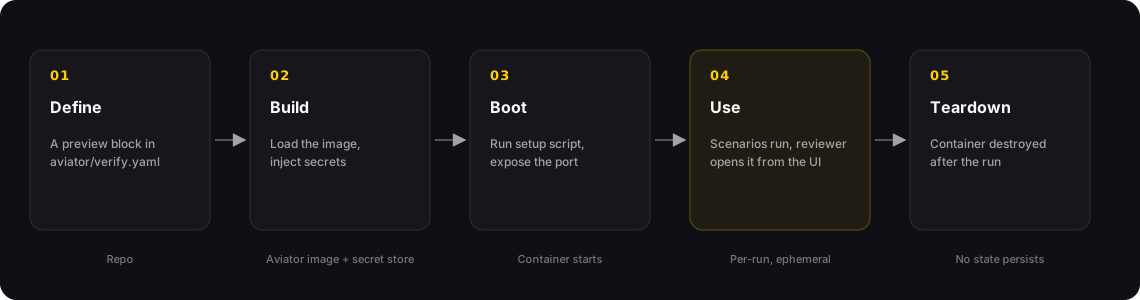
A preview moves through five phases
| Phase | What happens |
| ------------ | ------------------------------------------------------------------------------------------------------------------------------------ |
| **Define** | The preview is configured in the Verify settings in the Aviator dashboard (**Verify → Settings → Verify**, with the repo selected). |
| **Build** | Aviator boots a container from the cached image and prepares the environment. |
| **Boot** | The setup script runs. The declared port becomes reachable. |
| **Use** | Scenarios execute against the preview. Reviewers can also open it from the UI. |
| **Teardown** | When the branch moves to a new commit (or the preview is stopped), the optional teardown script runs and the container is destroyed. |
Whether a run starts fresh depends on whether the branch has moved. When a verification run starts, Aviator compares the branch's current head SHA to the SHA the existing preview was built from:
* **New commit since the last run** — the old container is torn down and a fresh one is built and booted. The setup script runs. The run starts from a clean slate.
* **Same commit (a re-run)** — Aviator reconnects to the already-running container and skips the setup script entirely. Everything from the previous run persists: database rows, files, logged-in sessions.
The practical consequence: if your scenarios mutate data, a re-run on the same commit sees the previous run's leftovers. Push a new commit (or stop the preview) to force a clean boot.
### Composition
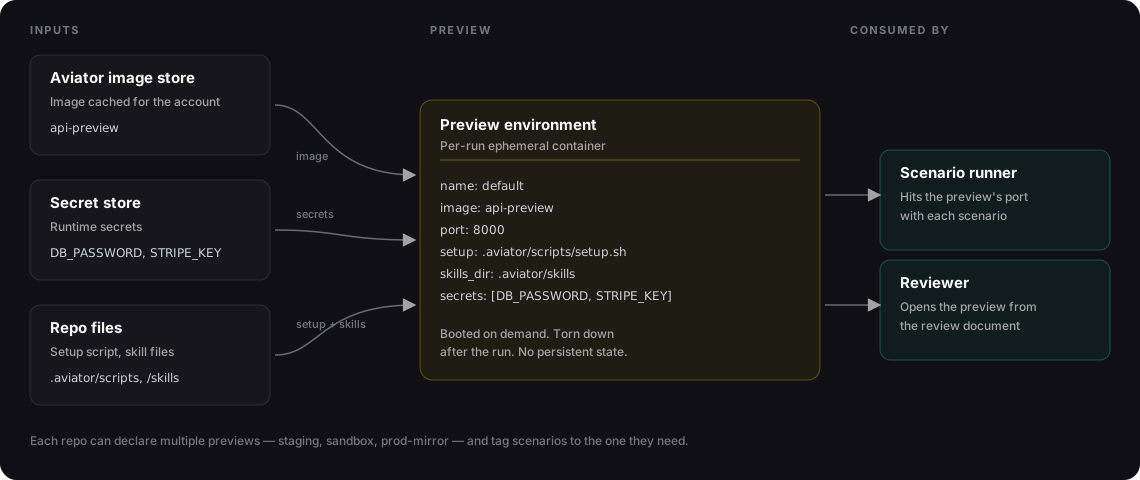
A preview is composed of inputs from three places: a preview image, your secret store, and your repo.
Where each piece of a preview comes from, and what uses it
* **Image** — a preview image registered with Aviator for your account. Aviator caches the image locally and boots containers from it. Register images through **Settings → Sandbox** in the Aviator UI.
* **Secrets** — runtime secrets (DB passwords, API keys) referenced by name from the account secret store and injected as environment variables when the container boots.
* **Setup script** — optional. Runs after the container starts and before the port is marked ready. Used for migrations, seeding, warm-up.
* **Teardown script** — optional. Runs before destruction to release external resources.
* **Port** — the port the runner connects to. The container is considered ready when this port accepts connections.
Aviator stitches these together into a single ephemeral container. Your Verify settings are the contract — see [Preview YAML reference](/verify/reference/preview-yaml.md) for every field.
### Externally hosted previews
Many teams already deploy an ephemeral environment for every pull request from their own CI. Rather than have Aviator build a second one, a preview can be declared as **externally hosted** — `method: endpoint` in the config. The environment stays yours; Aviator only borrows it.
The split of responsibility:
| Your CI does | Aviator does |
| --------------------------------------------------------------- | ----------------------------------------------------------------------------- |
| Builds and deploys the environment for the pull request | Correlates the registration to the verification session for that PR or branch |
| Registers its URL (and the commit it's running) with Aviator | Waits for a registration when a run needs one |
| Destroys the environment on its own schedule | Drives the app at the registered URL and records the evidence |
| Optionally deregisters early when it tears the environment down | Stops using the registration at its expiry |
Aviator never builds or tears down an externally hosted preview, and never holds infrastructure credentials for it — the environment is already running by the time Aviator sees it.
**Waiting, then degrading.** Verification and the deploy pipeline run on their own clocks, so a run that needs the preview waits for one to be registered, up to a configured timeout. If the registration arrives in time, scenarios run against it. If it doesn't, verification still completes on code analysis alone — a degraded result rather than a failure — and a registration that lands afterwards starts a follow-up verification automatically. A registration also has to match the commit being verified: one built from a stale commit never drives the run.
**Choosing between the two methods:**
| Choose sandbox when… | Choose endpoint when… |
| ------------------------------------------------------------- | ------------------------------------------------------------------------------------------------------------------------- |
| You don't already build per-PR environments and don't want to | You already run per-PR ephemeral environments in CI |
| The service boots from an image plus a setup script | The environment needs infrastructure Aviator can't host — managed data stores, private networks, a multi-service topology |
| You want previews with no CI work at all | You want verification to run against the same environment your team already reviews |
See [Registering an external preview](/verify/how-to-guides/registering-an-external-preview.md) for the registration call and its semantics.
### Multiple previews per repo
A repo can have more than one preview configured. Common patterns:
| Pattern | Why |
| --------------------------- | -------------------------------------------------------------------------------------------------------------------------------------------------------------- |
| **`default`** only | Single API or service. One image, one set of secrets. |
| **`default` + `mirror`** | The mirror preview points at a more production-like configuration — bigger seed data, real third-party sandboxes. Used by scenarios that need higher fidelity. |
| **`api` + `worker` + `db`** | Multi-service apps. Each scenario picks the preview that matches the code it touches. |
| **`light` + `heavy`** | Light boots fast and is used by most scenarios. Heavy boots slow but covers integration tests that need full setup. |
Scenarios target a preview by name. If no name is set, scenarios run against `default`.
### When previews are used
Previews only spin up when the verification run has at least one **runtime** criterion — a criterion the classifier decides needs to be checked against the running code (see [How verification works](/verify/concepts/how-verification-works.md)). If every criterion can be verified by code-scan alone, no preview is built and the run finishes faster.
This matters for cost: previews are the expensive part of verification. The classifier minimizes their use by routing structural assertions away from the runtime path when possible.
### Reviewer access
The review document exposes a per-run "Open preview" link. Clicking it gives the reviewer access to the same ephemeral container the scenarios ran against — same data, same configuration, same code under test.
The link expires when the sandbox times out and the preview is torn down. The window is controlled by **Sandbox Timeout (minutes)** under **Verify → Settings → Sandbox** (default 60, up to 240). If reviewers routinely need longer sessions, raise that setting; a preview that has already been torn down can be launched again from the review document.
### Previews vs. CI environments
Previews look like CI environments but they're not the same thing:
| | Preview | CI environment |
| ------------- | ---------------------------------------- | ------------------------------------- |
| Triggered by | Verify run | Push, PR open, schedule |
| Lifespan | Until the branch moves to a new commit | Per job (minutes to hours) |
| Configured in | Verify settings in the Aviator dashboard | CI provider config (GH Actions, etc.) |
| Used by | Scenario runner + reviewer | Test runners, build pipeline |
| Purpose | Make behavioral verification real | Run the test suite, ship artifacts |
### See also
* [Preview YAML reference](/verify/reference/preview-yaml.md) — the schema
* [Creating a preview](/verify/how-to-guides/creating-a-preview.md) — walkthrough
* [Managing previews](/verify/how-to-guides/managing-previews.md) — bake vs. setup, refresh, cleanup
* [Seed data for previews](/verify/how-to-guides/seed-data-for-previews.md) — fixtures and deterministic state
* [Registering an external preview](/verify/how-to-guides/registering-an-external-preview.md) — using an environment your CI deploys
---
# Agent Instructions
This documentation is published with GitBook. GitBook is the documentation platform designed so that both humans and AI agents can read, navigate, and reason over technical content effectively. Learn more at gitbook.com.
## Querying This Documentation
If you need additional information that is not directly available in this page, you can query the documentation by asking a question.
Perform an HTTP GET request on the following URL with the `ask` and `goal` query parameters:
```
GET https://docs.aviator.co/verify/concepts/previews.md?ask=&goal=
```
`ask` is the immediate question: it should be specific, self-contained, and written in natural language.
`goal` is what the user is ultimately trying to achieve, the reason they need the answer. Sharing it helps GitBook give you a better, more relevant answer. A goal is most helpful when it describes the outcome the user wants rather than restating the question. For example, with `ask=how do I create an API token`, a goal like `automate deployments from our CI pipeline` lets GitBook tailor the answer to that use case.
The response will contain a direct answer to the question and relevant excerpts and sources from the documentation.
Use this mechanism when the answer is not explicitly present in the current page, you need clarification or additional context, or you want to retrieve related documentation sections.